Trouble Shooting
Overview
The status address in a Weincloud Server object's property settings is updated in real time with a numeric value that indicates the object's current connection and operating status with the Weincloud service. When a connection error or warning occurs, read the current value of the status address and compare it against the error code table below to identify the issue and determine the appropriate troubleshooting action.
Checking an Error Code
Prerequisite: A Weincloud Server object has been placed in the project, and a status address has been specified in its property settings.
Steps:
In EasyBuilder Pro, open the property settings of the Weincloud Server object and confirm the status address currently specified.
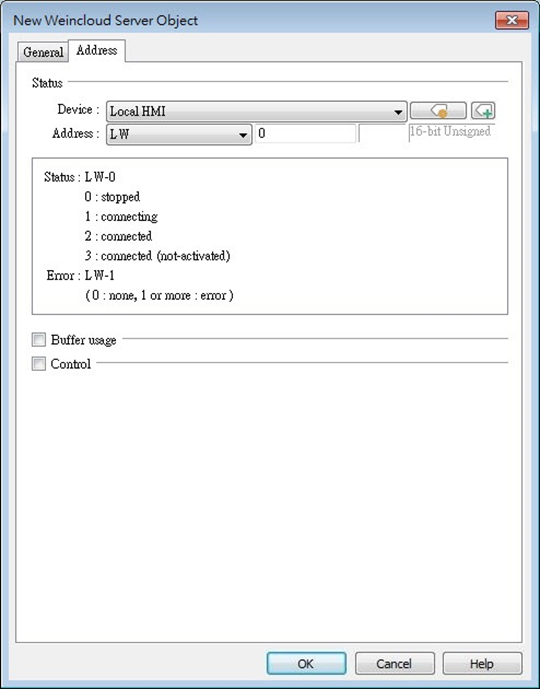
Read the current value of the status address.
Look up the value in the error code table below to find the corresponding error code name and description, and act accordingly or contact your nearest distributor.
Error Code Table
| Code | Name | Description |
|---|---|---|
| 0 | NoError | No error. |
| 1 | InternalError | Internal server error, please contact your nearest distributor. |
| 2 | UnknownError | Unknown error, please contact your nearest distributor. |
| 100 | WarnStartWhenRunning | Start command is repeatedly sent while running. |
| 101 | WarnHasUnmatchedTag | Tags on the HMI do not match the tags in Data Source, please synchronize the tags again. |
| 200 and above | ServerConnectFailed | Failed to connect to the server, please check the HMI's network settings and time settings. |
Notes
- When InternalError (1) or UnknownError (2) occurs, contact your nearest distributor for assistance rather than attempting to resolve it yourself.