Getting Started
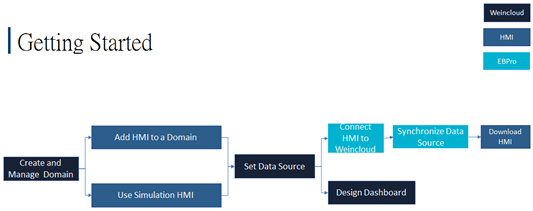
Dashboard design and HMI project design (in EasyBuilder Pro) can be carried out separately by different roles. This page describes the recommended workflow for each of the two scenarios below, depending on whether Dashboard has been activated for the HMI.
Scenario 1: For a User Who Has Not Activated Dashboard for an HMI
- Create a Domain in Weincloud.
- Add data source tags using one of the three simulation HMIs available in the Domain.
- Sync the tags in the EasyBuilder Pro project and map them to device addresses, then run an on-line simulation to send the data to the Weincloud server.
- When designing a dashboard, select the tags of a simulation HMI in Data Source to start designing the dashboard project right away. Later, when an actual HMI is added to the Domain, use the tag export / import function on the [Data Source] page together with the [Replace HMI] function in the dashboard project to quickly convert the simulation HMI addresses in the dashboard project to the actual HMI addresses, speeding up project development.
Scenario 2: For a User Who Is Going to Activate Dashboard for an HMI
- Create a Domain in Weincloud.
- Add an HMI to the Domain by activating Dashboard or using a trial license.
- On the [Data Source] page, select the HMI for which Dashboard has been activated, and add data source tags.
- Sync the tags in the EasyBuilder Pro project and map them to device addresses, then download the project to the HMI. Once the HMI connects to the Weincloud server, its data can be uploaded.
- When designing a dashboard, select the tags of the HMI in Data Source to remotely monitor the HMI through the dashboard.
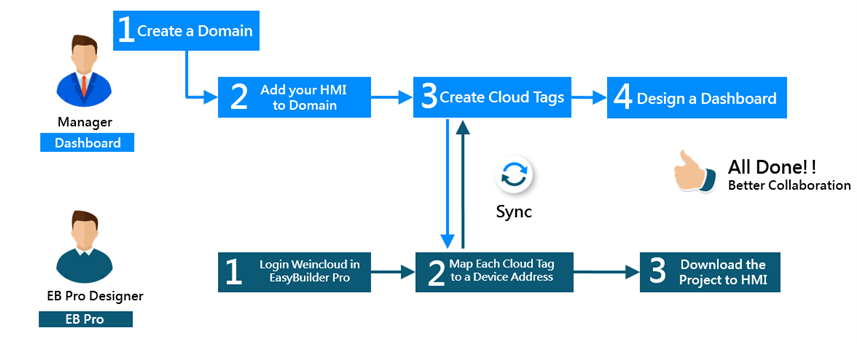
Dividing Dashboard and HMI Project Design Work
Once the EasyBuilder Pro project designer syncs the data source tags created by the dashboard designer and maps them to device addresses, the HMI uploads data to the Weincloud server. The dashboard designer can then design a customized dashboard and publish it to authorized users for remote data monitoring.
In other words, dashboard design and HMI project design can proceed independently: as soon as the dashboard designer creates the data source tags, the HMI project designer can sync the tags and map them to device addresses on their end, sending the HMI data to the Weincloud server.
For details on creating and managing data source tags, see Data Source. For details on creating and editing dashboard projects, see Dashboard Project.