Subdomain Management
Overview
A Subdomain is the mechanism Weincloud uses to delegate administration within a large organization. An administrator can assign folders within a Domain to different people, allowing each of them to manage the members and HMI devices within their authorized folder—much like an administrator would—without touching the resources of other departments or production lines. This lets the top-level administrator delegate day-to-day operations while keeping each delegate's permissions isolated, balancing management flexibility with information security.
Use Cases and Intended Audience
- Domain Superuser / Administrator — the person who registers with Weincloud becomes the Domain Administrator and holds full control over the entire domain. Suitable for planning the overall folder structure and assigning the person in charge of each Subdomain.
- Subdomain Superuser — a delegate authorized to manage a specific folder. Suitable when an organization divides administrative responsibility by department, production line, or region, needs to hand day-to-day operations of a defined scope to a dedicated person, and requires that delegates cannot access one another's resources.
Feature Details
The Relationship Between a Domain and a Subdomain
A Domain is the administrative area within the Weincloud system, established at registration; the registrant becomes the Domain Administrator. The administrator organizes and manages HMI devices using folders under the Domain. For permission management, these folders—including their nested subfolders—each constitute a Subdomain that can be assigned its own delegate and permissions. See Directory for details.
Assigning a Subdomain Superuser
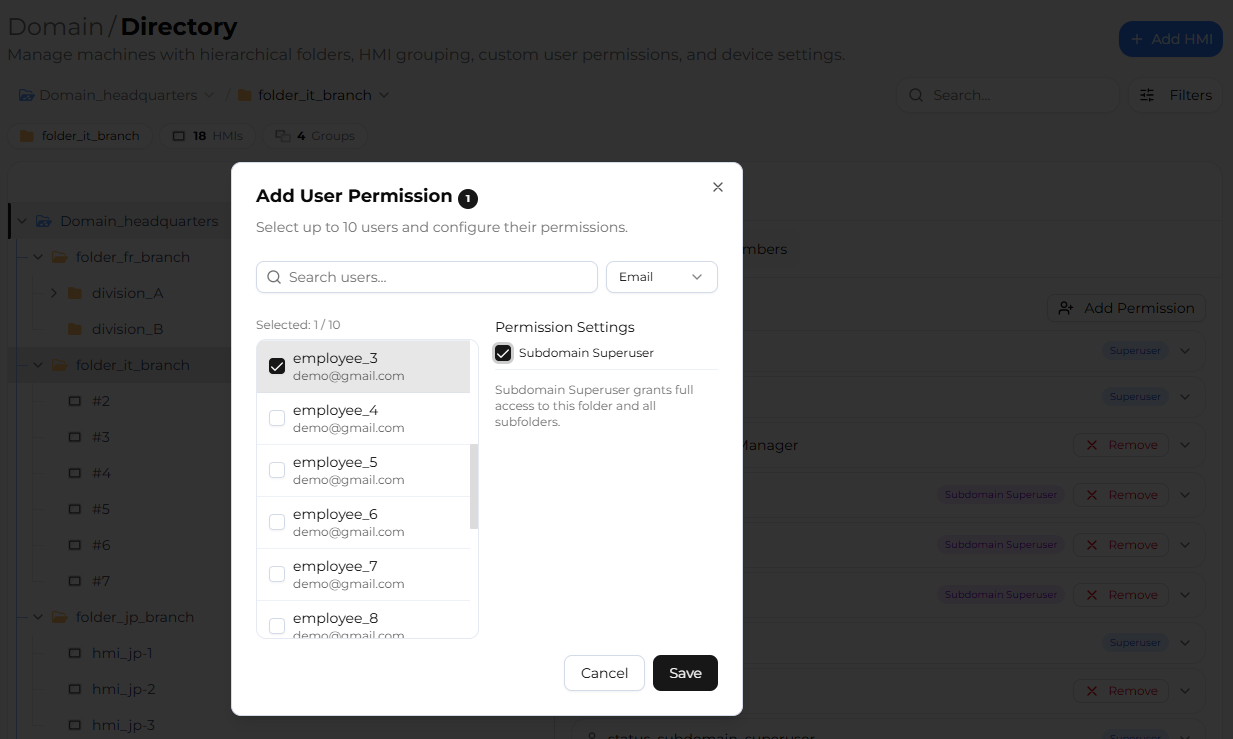
Whether a user is a Subdomain Superuser depends on the permission granted to them on a folder, not on any property of the folder itself. To assign a delegate, go to the [Directory] page, set the user's permission on the target folder, and select the Subdomain Superuser permission. The user granted this permission becomes the Superuser of that folder (Subdomain).
Note: Subdomain Superuser is a distinct folder permission, available only on folder nodes. General access permissions (such as HMI-Basic, Dashboard, or EasyAccess 2.0) grant only the corresponding access capability and do not make the user an administrator. A single Subdomain can be assigned multiple Superusers.
Permission Inheritance and Management Scope
Granted permissions are automatically applied to all subfolders and HMI devices within the folder, in accordance with Weincloud's Inherit Feature. To set an independent permission for a specific HMI device only, that setting applies solely to that device and does not affect others.
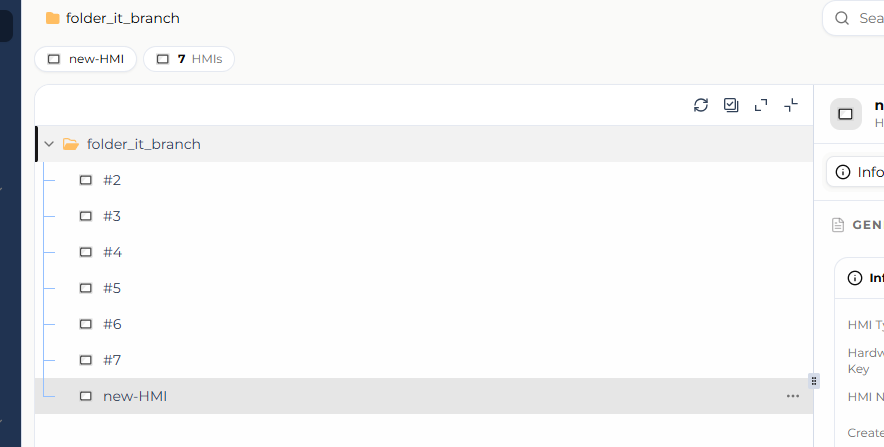
Within their authorized Subdomain, a Subdomain Superuser has member and HMI management permissions comparable to those of the Domain Administrator, but their visible and operable scope is strictly confined to that Subdomain. The directory tree the system presents to such a user is rooted at their authorized folder; therefore, folders, members, or HMIs outside that Subdomain do not appear and cannot be selected in the interface. This is why new HMIs or users can only be added under that Subdomain—the operation is not separately blocked; nodes outside the scope simply are not shown.
The Scope of a Subdomain Superuser's Operations
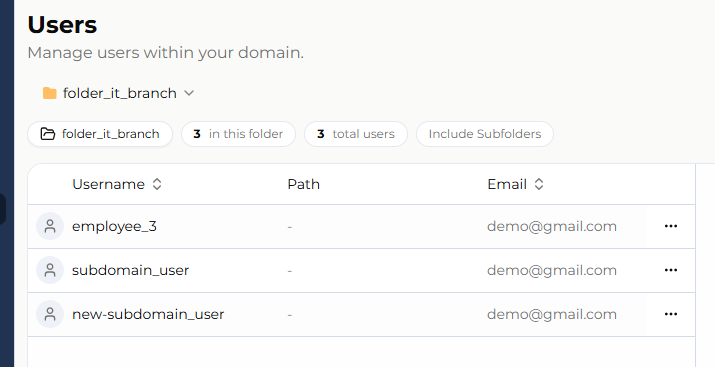
Different permissions correspond to different interfaces. After signing in, a Subdomain Superuser can manage members (users) and HMI devices within their Subdomain, including adding, editing, moving, and deleting users. See User Management for details.
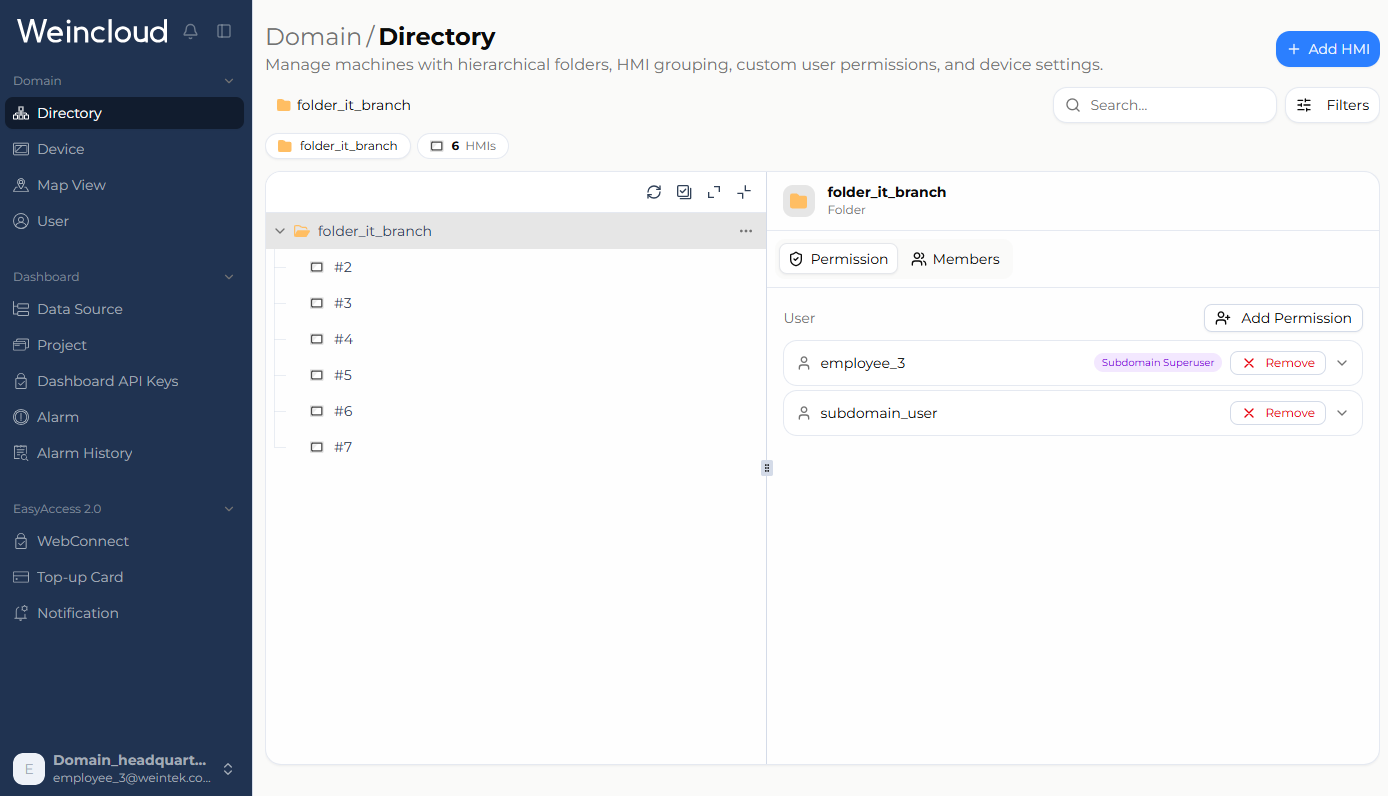
New HMIs or users can only be added under this Subdomain.
Subdomain Management Example
A factory initially has one production line with three HMI devices, managed directly under the Domain. As the factory adds a second line, the administrator can create two folders, "Line A" and "Line B," place the corresponding HMIs and users in each, and assign Anna as the Subdomain Superuser of "Line A" and Benson as the Subdomain Superuser of "Line B." From then on, Anna can manage only the devices and members within "Line A" and cannot access the contents of "Line B," and vice versa.
If these folders are further organized into a larger "Company" folder, with Canna assigned as the Subdomain Superuser of "Company," Canna then holds management permissions over all of its subfolders and HMI devices. When an HMI device is added in the control room to monitor both production lines, it can be placed in the "Company" folder so that only Canna can monitor it, while neither Anna nor Benson can access it. This layered delegation mechanism provides both flexibility and security in permission management.
Limitations and Notes
- The Subdomain Superuser permission can only be set on folder nodes. Groups and individual HMI nodes do not offer this permission option.
- The Groups feature is restricted to Domain Superusers. Creating, renaming, adding HMIs to, and deleting HMI groups—and even the group list itself—are available only to Domain Superusers; Subdomain Superusers cannot use them.
- A Subdomain Superuser cannot promote others to Domain Superuser. The "Domain Superuser" option appears only when a user is located at the domain root, so a Subdomain Superuser cannot elevate their managed members to the Domain level.
- Certain account-security actions are exclusive to Domain Superusers. Unlocking an account and resetting multi-factor authentication (MFA) can only be performed by a Domain Superuser; a Subdomain Superuser does not see these two actions.
- Inherited permissions cannot be revoked at a lower level. An inherited permission can only be augmented at lower levels, not removed. See Directory – Inherit Feature.
FAQ
Q: Does setting a general access permission (such as HMI-Basic) on a folder make a user its administrator? A: No. A general access permission grants only the corresponding access capability. A user must be explicitly granted the Subdomain Superuser permission to become the Superuser of that Subdomain.
Q: How many Superusers can a Subdomain have? A: It can have multiple. They hold the same permissions within that Subdomain, all confined to the scope of that Subdomain.
Q: Can a Subdomain Superuser add members or HMIs to other folders? A: No. Their visible and operable scope is limited to the authorized Subdomain; nodes outside the scope are not shown in the interface, so any member or HMI they add can only be placed under that Subdomain.