Alarm Notification
Overview
When an alarm rule is triggered, the system can send a notification to the email inbox of the users you configure, so they can stay aware of alarm status without watching the Dashboard continuously.
Who This Is For
Intended for the person responsible for a given alarm, or operations team members who handle exceptions when they occur.
Prerequisites
Alarm Notification settings are embedded in the alarm rule's Add Rule / Edit Rule screen, not a separate page. You must first create the alarm rule before configuring its notifications — see Alarm.
Configuring Alarm Notification
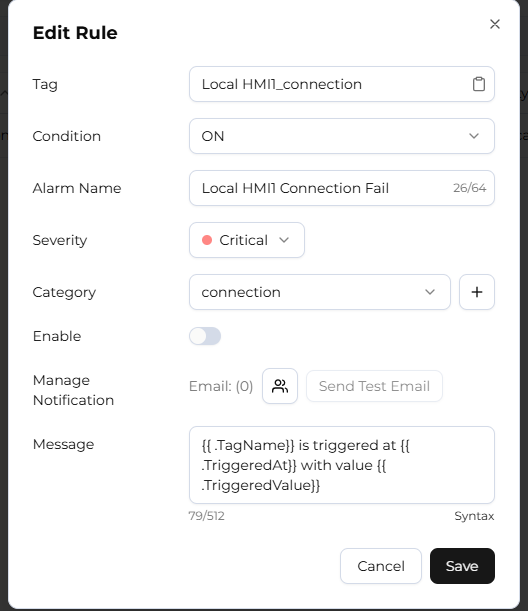
Select the users to notify
On the alarm rule's edit screen, select one or more users to receive notifications for that rule. Up to 10 users can be selected per alarm rule.
Confirm each user's notification settings
Notifications are sent to each user's configured email address. A user who wants to stop receiving all system notification emails, including alarm notifications, can turn off the "Email Notifications" switch on the Account Settings page; this does not affect authentication emails such as verification codes and password resets.
Send a test email
Click the [Send Test Email] button to send a test email to your configured email address. After sending, you must wait for the countdown shown by the system before you can send another.
Limitations
- Up to 10 users can be selected to receive notifications per alarm rule.
- Each email inbox receives at most 1 notification email every 5 minutes; all alarm events triggered during that period are merged into a single email.
- If different users share the same email address, they also receive a single merged email.
- Test emails can be sent once every 60 seconds.
- The "Email Notifications" switch controls alarm notifications together with other system event notifications — it is not specific to alarms.
FAQ
Why am I not receiving alarm notifications?
Check, in order: (1) whether you are included in that alarm rule's notified user list; (2) whether the "Email Notifications" switch is turned on in Account Settings; (3) if several alarms were triggered in a short time, the system may have already merged them into one email — check whether it contains the relevant events.